HELIX PASSPORT
WhatsApp
Helix Passport
HELIX
PASSPORT
For businesses Español

Your business, inside the city’s passport.

Helix Passport is an app for discovering good places around the city. Your business shows up on the map with its photos, its hours and its menu. Every time a customer visits you, the app records a stamp, and once they collect the number you set, they get the reward you chose to offer.

The city is the destination.
Pantalla de inicio de Helix Passport con los lugares verificados de La Paz
In short

A travel passport, except it’s for your own city.

It’s called Passport because it works like one. Your customer carries a digital booklet and every visit leaves a stamp in it. Once they collect the stamps you asked for, they get the reward you offered. And the more places they visit, the better they rank in the city’s monthly prize.

For the customer it’s a reason to go out and try new places. For you, it’s a customer who comes back because they have something going with you.

Página de sellos del pasaporte con cinco negocios visitados en La Paz
The stamp page of a real explorer in La Paz: five places visited, with the date of each visit and how many times they’ve been back to each one.

Real places

We check every business before publishing it. If it’s on the map, it exists and it’s open. No made-up listings, no places that closed years ago.

Stamps that mean something

A stamp is earned with a real visit from a paying customer. You decide how many visits the reward takes and what you hand over when they get there.

Prize of the month

Every month, in every city, there’s a prize for whoever explores the most. It changes month to month and pushes people toward places they didn’t know.

What your customer experiences

Four steps, all inside the same app.

1

Discovers

They open the map and see verified places nearby, each with its deal of the day and what they can earn there.

2

Stamps the visit

On arrival they show their code and your staff scans it. That stamp stays in their passport with the date.

3

Collects and wins

Once they complete the visits you asked for, they get their reward. And their stamps move them up the monthly ranking.

4

Books and orders

From your listing they open your catalog and book, order, schedule or buy — without leaving or signing in again.

Mapa de Helix Passport con los negocios verificados de La Paz
Discover. The city map, searchable by business or by product.
Pantalla para registrar una visita mostrando el código QR del cliente
Stamp. The customer shows their code, you scan it, and the stamp is saved with its date.
Hoja de datos del pasaporte del explorador
Their passport. Their data page: passport number, city and access pass.
The other half

Being discovered is the first half. The second is letting them act on it right there.

They tap View catalog on your profile and they move to Helix One, the part of Helix Passport where they book, order, schedule or buy. It isn’t another app and there’s nothing to download: they stay in the same passport, with the same session and the same cart. And when they’re done, that purchase counts toward their visits and stamps with you.

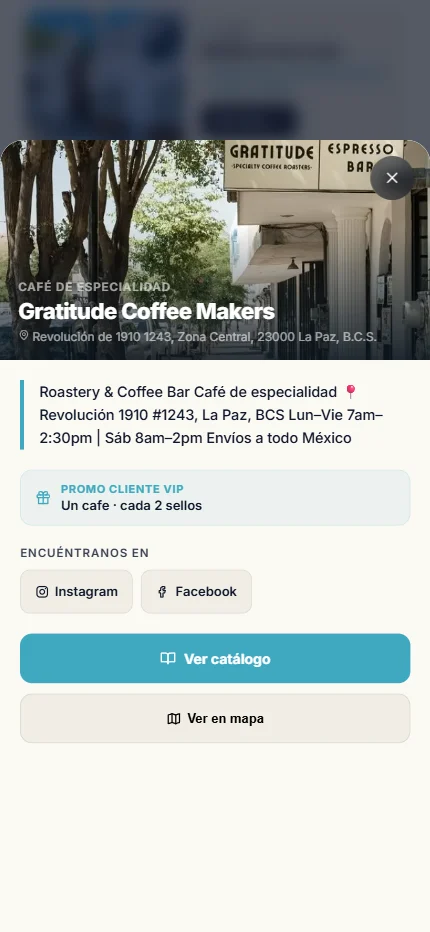
Ficha de un negocio en Helix Passport con su recompensa
Your listing: photos, description, your reward and the button that opens your catalog.
Catálogo de un restaurante con fotos, descripciones y precios
Your catalog with photos, descriptions and prices. The customer builds their order and pays or picks up.
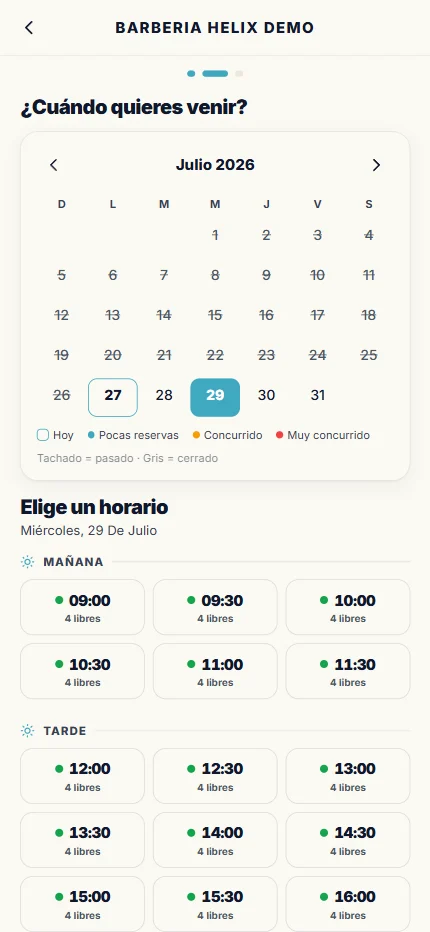
Calendario para agendar una cita con un profesional
Appointment booking: service, professional, day and time, with open slots shown live.
About delivery. Helix Passport has no drivers of its own and does not offer a delivery service for now. If your business already has its own drivers, you can turn on delivery: orders come in through the app and your own people deliver them, with the dispatch board and live tracking included. If you don’t have drivers, it simply stays off and your customers order for pickup or eat in.
For you

New people who find you, and regulars who keep coming back.

New traffic

Whoever opens the app is already deciding where to go. That’s where you show up — in front of locals looking for something different and tourists who just arrived.

Customers who return

The reward gives them a concrete reason to come back to you. You set the visit goal and what they get: a coffee, a dessert, a service. And if you turn on the birthday gift, your business gets its own pin on the map.

Presence on the map

Your pin, your photos, your hours, your deal of the day and your social links, on the city map. With product search: someone typing “sushi”, “flowers” or “haircut” finds yours.

On top of that

Your whole operation running, without buying another system.

Turn on what you use, turn off what you don’t.

  • Point of sale with receipts, discounts, tips and X/Z reports
  • Card payments by terminal, QR code or saved card
  • Upload your menu from a photo: AI captures it and you review it
  • Catalog with photos, add-ons and options, in four languages
  • QR codes for your catalog — for social, the entrance or the tables
  • Inventory and costing with recipes and automatic deduction
  • Deal of the day and rewards for regulars
  • Your team with roles and the permissions you grant
  • History and cancellations with reasons, plus statistics
  • Instant alerts to your panel and to the customer’s phone
  • Reviews linked to your Google profile
Point of sale: buscador, catálogo por categorías y el ticket con el total
The point of sale: search by name or code, tap what they’re taking, and the receipt builds itself. Works the same on phone, tablet and computer.
Up close

Four tools that change the everyday.

They work the same for a restaurant, a barbershop, a gym or a shop. What changes is what things are called, not the tool.

01 · Take a photo of your menu or price list and it’s loaded

You don’t have to type your catalog in by hand. Take one photo and the AI records every product or service with its description and its price. Tú you review and fix them before saving, because a misread price is real money lost. It doesn’t matter whether it’s your kitchen menu, your barbershop’s price list or the service board taped to your wall.

Once it’s loaded, it translates itself into English, German and French, and it re-translates every time you change a price or add something. A tourist reads it in their language with one tap, and you never have to reprint anything.

02 · A QR code at every spot in your place

Every spot in your place can carry its own code: a table, the counter, the display case, the entrance. The customer scans it and sees your full catalog with photos and prices. In a restaurant, they build their order and it reaches the kitchen already tagged with the table number, with nobody typing it in.

In other trades the same code lets them browse your catalog, book an appointment or buy from their phone while they wait. And if you’d rather they didn’t order on their own, you turn it off and the code just shows your catalog.

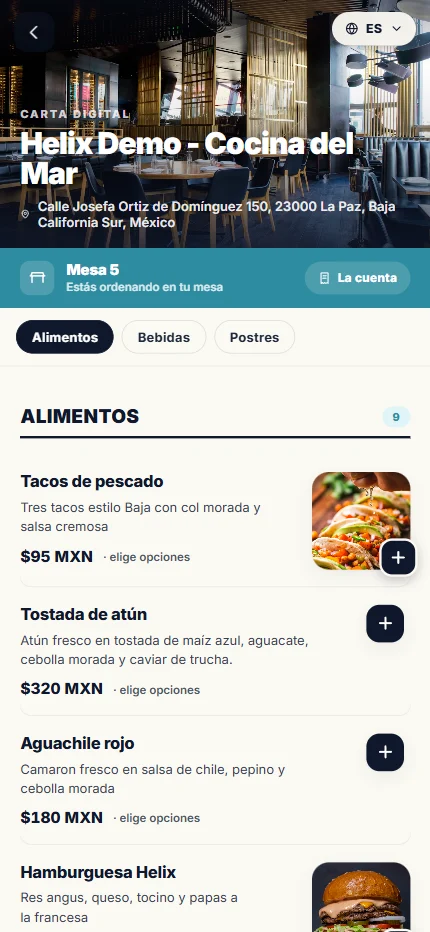
Carta digital que ve el cliente al escanear el código QR de su mesa
What the customer sees when they scan their table’s QR: your menu with photos, the table number, the bill button and the language picker.

03 · A floor plan of your place, with the status of every spot

You lay out your place as it really is and add its working spots: tables if you’re a restaurant, chairs if you’re a barbershop, stations if you tattoo, treatment rooms, classrooms or equipment areas if you’re a gym. Each with its name and capacity. During service you see the whole map color-coded by status: what’s free, what’s taken, what has a booking on the way and what you blocked off.

You can move the clock and see how your place will look at nine at night before anyone arrives. Whoever greets can hold a spot while the customer is on the way, and the manager rearranges if needed.

All we ask the customer for is the day, the time, how many people are coming and whether they prefer an area or a particular professional. You assign the actual spot, based on how your place looks at that moment.

Plano del salón de un restaurante con 25 mesas y su estado en tiempo real
Your floor plan: every table with its capacity and status, plus the count of free, taken, upcoming and blocked.

04 · How much stock is left and what each sale costs you

You record your supplies with their cost (a kilo of shrimp, a bottle of ink, the polish, a box of gloves) and define what each product or service consumes. From then on every sale deducts what was used on its own and you see your stock in real time, without counting by hand.

Because the system knows what each thing consumes, it also shows you what it costs you and how much profit it leaves every time you sell it. And if a supply runs out, that item hides itself from your catalog so nobody orders it.

Inventario de insumos con existencia y costo por unidad
Your supplies with stock and cost per unit, and the button to restock.
By trade

What you get.

Helix Passport isn’t one generic product: when you sign up you pick your trade and the app adjusts. If you do two things at once — a barbershop with a tattoo studio, a café that also sells beans — they split into tabs inside your same catalog.

Restaurant, café and bar

Kitchen, coffee shop, seafood, food truck, bakery, bar
If your business serves food, here’s what you get:
  • Digital menu with photos and prices, translated into four languages
  • A QR per table: they order from their seat and it goes straight to the kitchen
  • Kitchen display with prep times
  • Table reservations on your real floor plan, by room and time
  • Servers with their own login: their tables, their orders, splitting the bill
  • Inventory with recipes: out of an ingredient and the dish hides itself
  • Delivery only if you have your own drivers

Barbershop, salon, spa, tattoo and nails

Anything booked with a person
If your business runs on appointments, here’s what you get:
  • A schedule per professional: each chair with its barber or artist, and the customer picks who
  • Real duration per service, so two appointments never overlap
  • Add-ons that cost and take time: they add price and add minutes to the appointment
  • A deposit to hold the slot, with your own cancellation policy
  • Quote before booking: they send their idea and a reference photo, you quote it
  • Sell products alongside the service, in the same catalog
  • Board of the day: who’s working, which chair is free and who’s next

Gym, studio and clinic

Gym, yoga, CrossFit, pilates, nutrition, dental, physio
If your business runs on classes, capacity or consultations:
  • Memberships and passes: monthly, weekly, daily or a single class, paid from the phone
  • Member control: who’s current, who owes and since when
  • Classes with capacity, each with its time and its instructor
  • Capacity of the open floor live, separate from classes
  • A plan of your areas: members see how full it is before leaving home
  • Access pass on the phone, it changes every time and works only once
  • Encrypted clinical records for dentists and specialists: only you can open them

Lodging

Hotel, hostel, cabins, glamping
If your business rents nights, here’s what you get:
  • Booking by night with a check-in/check-out calendar and booked dates shown live
  • Rooms with multiple photos, nightly price and how many people fit
  • Stay add-ons: extra bed, breakfast, transport
  • Deposit on booking with the balance charged at the front desk
  • Arrivals board: check-in, check-out, no-shows and who still owes
  • Your own policy for cancellations and deposits

Tours and activities

Snorkeling, diving, fishing, kayaking, wildlife watching, city tours
If your business sells departures with limited spots:
  • Capacity per departure: each time slot with its spots, closing itself once full
  • Book with a deposit or full payment, whichever you decide
  • Passenger list for the day, with names and party size
  • Cancellation policy yours, with automatic refunds where they apply
  • Listing in four languages: tourists read your tour in their own language

Shops, services and trades

Florist, clothing, gifts, workshop, laundry, photography, events
If you sell products or do custom work:
  • Catalog with photos, variants and options per product
  • Buy for pickup, with a notice when it’s ready
  • Inventory with stock that goes down on its own with every sale
  • Fixed price or by quote, depending on the job
  • Quote thread: the customer describes it and sends photos, you reply with a price and how long it’s valid
  • Delivery only if you have your own drivers

What if your trade isn’t on this list?

Helix Passport is built from loose parts: catalog, scheduling, capacity per time slot, nights, payments, stamps. They combine according to what you do. If your business doesn’t land exactly in any of these boxes, we look at it with you and assemble it from those same parts, at no extra charge.

Price

One flat fee. No surprises.

$350
MXN per month
  • Tax included. The price you see is the price you pay.
  • Invoicing is no problem. Ask for your invoice and we issue it.
  • No binding contract and no minimum term.

What exactly you’re paying for

The $350 a month covers your place in Helix Passport: your profile and your location on the map, your loyalty program with stamps and rewards, and entry into the monthly prize. That’s the price and it doesn’t change. Your first month also includes the printed material and NFC tags for your place, at no extra charge.

And the tools, in the meantime

Today they’re all included at no extra cost: point of sale, reservations, scheduling, table QR codes, a menu in four languages, inventory and costing. It stays that way while we finish tuning each trade. If they’re ever rearranged into different packages, we’ll tell you early and to your face, never from one month to the next. And whatever happens, being in Helix Passport with your loyalty program and your place on the map stays at $350 a month.

Your first month

The material for your place is included

With your first month we hand you, at no separate cost, everything you need so people know you’re on Helix Passport: your sidewalk sign, your counter QR stand with NFC (that carries your business code, the one used most) and 10 more NFC stickers for your tables or your digital menu. The customer taps their phone or scans the code — either way, both lead to the same place.

How to start

Your business is ready the same day.

1

You say yes

A message or a call. We ask what your business does and what reward you’d like to offer.

2

We set you up

We walk you through loading your trade, your catalog, your photos, your hours and your reward.

3

We test it together

We stamp a test visit, put through an order and make sure your team knows how to use it.

4

You go live on the map

We publish your listing, and from then on you show up for anyone looking for somewhere to go in your city.

What we need from you

  • Your business name, address and hours
  • A few good photos of the place and of what you sell
  • Your list of products or services with prices
  • What reward you want to give and how many visits it takes
  • A phone, tablet or computer with internet for your panel
Questions

Frequently asked questions.

How much does Helix Passport cost a business?
$350 Mexican pesos a month, tax included, with an invoice if you need one. There’s no binding contract and no minimum term. That price covers your place in Helix Passport: your listing and your pin on the map, your loyalty program with stamps and rewards, and entry into the monthly prize.
What exactly is Helix Passport?
It’s an app where people discover the best places in their city, stamp a visit every time they go to one, and earn rewards for doing it. It works like a travel passport: each business leaves its stamp in the customer’s digital booklet. For the business it’s a loyalty program, a place on the city map, and a complete system to operate: point of sale, reservations, appointment scheduling, a catalog in four languages and inventory.
Does Helix Passport take a commission per sale?
No. The monthly fee is the only thing Helix Passport charges. What you charge your customers is yours; if you take card payments, the only deduction is the payment processor’s fee, which is the same one you’d pay with any terminal.
Does Helix Passport deliver?
No. Helix Passport has no drivers and offers no delivery service. If your business already has its own drivers, you can turn on delivery: orders come in through the app and your own people deliver them, with the dispatch board and tracking included. If you don’t have drivers, your customers order for pickup or eat in.
Which cities does it work in?
Helix Passport was born in La Paz, Baja California Sur, and that’s where its most active community is. The platform is multi-city: explorers choose where they’re exploring from and see the places in that city. If your business is in another city, write to us and we’ll look at it.
What kinds of business fit?
Restaurants, cafés and bars; barbershops, salons, spas, tattoo and nail studios; gyms, yoga studios and clinics; hotels, hostels and cabins; tours and activities; shops; and custom services such as workshops, laundries, photography and events. When you sign up you pick your trade and the app configures itself for it. If you do two things at once, they split into tabs inside your same catalog, at no extra cost.
Do I have to type in my menu dish by dish?
No. You take a photo of your menu — printed or on a chalkboard — and the AI reads the dishes with their descriptions and prices. You review and fix whatever needs it before saving, because a misread price is real money lost. From then on it translates itself into English, German and French.
What do you give me to put up in my place?
Your first month includes, at no separate cost, the material for your place: a sidewalk sign, a counter QR stand with NFC (carrying your business code, the most important one) and 10 more NFC stickers for your tables or your digital menu. The customer taps their phone or scans the code; both lead to the same place.
Do I need to buy equipment or install anything?
No. Everything runs in the browser: a phone, a tablet or a computer with internet is enough. There’s no software to install and no terminal to buy. If you already have a card terminal, you can keep using it.
Do my customers have to download an app?
No download is required: Helix Passport opens in the phone’s browser and can be saved to the home screen like any app. They do need to create their passport with their name, their phone and a PIN, which is what lets us keep their stamps.
How long until my business is ready?
Setup happens in a single session, usually the same day. We walk you through loading your trade, your catalog, your photos, your hours and your reward, we test a stamp and an order together, and we publish your profile.
How do stamps and rewards work?
You decide what you give and how many visits it takes: a coffee at two stamps, a dessert at five, whatever you prefer. A stamp is only recorded when the customer comes to your business: they show their code and your staff scans it. Monthly stamps reset each month, and progress toward your reward is kept.

Shall we talk?

We’ll show it working before you decide anything.

Write to us and we’ll show you the app live with a real business: how a visit gets stamped, how an order comes in and what your panel looks like. No commitment and no sales pitch.